

Take control of merchant billing and deposit timing
December 30, 2025

Product news

On its own, merchant payment acceptance is relatively simple. Most payment providers can handle the basic tasks like auth/capture, settlement, and monthly statements. For individual merchants, that might be enough.
But vertical software platforms have different needs. They’re not just swiping a credit card, they’re enabling payment acceptance for an entire population of merchants. This means they need to manage merchants, deposit timing, funds flows, billing rates, and more. And they need to do it programmatically, at scale.
Generic payments infrastructure wasn’t built for this.
Rainforest was. We built our core technology – including our ledger – specifically for vertical software platforms. From day one, we anticipated the use cases and configurations you’d need.
Over the last 12 months, we quietly rolled out several enhancements and exposed additional configuration options to give software platforms more control over their embedded payments.
Here are a few of our favorites.
Apply a unique fee to any payment
In a standard model, billing fees are defined by the merchant's billing profile and Rainforest automatically calculates the billing fees when processing a payin or refund.
Rainforest also supports defining the billing fee on each payin and refund, which will override the merchant's billing profile. This allows for your platform integration to handle complex billing configurations that the merchant's single billing profile model does not support.

Learn more about dynamic payment billing fees
Upcharge for business and international cards
To offset higher passthrough costs, platforms can charge an additional fee for Business and International cards.

Learn more about business and international surcharging
Bill your merchants directly
Rainforest supports processing payments with stored deposit methods. Deposit methods are collected when onboarding your merchants and determines where the merchant's deposits will be deposited to.
The most common use case for processing payments from your merchants deposit methods is to bill your merchants for fees owed to your platform. Instead of having to re-collect the merchant's bank account information as a payment method to process a payin, Rainforest will handle the conversion of the merchant's deposit method to a payment method for you.
Learn more about processing payins from deposit methods
Show merchant fees as a column in payment reports
A column is available in the Payment Report Component to display the Merchant Fees associated to the payment.
This field is alsoavailable on the list payments endpoint as merchant_fees and represents the amount of the payment billed to the merchant, which includes fees defined by the merchant's billing profile and fees defined by the amount splits.

Learn more about the Merchant Fees column in the Payment Report Component
Choose daily, weekly, or monthly deposit frequency
By default, merchant deposits are configured to deposit daily. With Rainforest approval, deposits can now be configured to deposit weekly or monthly.
The deposit frequency schedules are:
- Daily - deposits processed on each US banking day
- Weekly - deposits processed on the first US banking day of the week
- Monthly - deposits processed on the first US banking day of the month
Learn more about merchant deposit frequencies
Control deposit timing
Deposit timing for payments is configured per merchant and determines when the funds for a payment will be available to be deposited to the merchant.
Payin deposit timing is dependent on the type of payment method used to process the payin:
- Card
- ACH
- Validated ACH
- Balance-Checked ACH
Each platform has the following configuration per payment method type listed above:
- Default deposit timing
- Minimum deposit timing
When a merchant is onboarded with Rainforest, by default, the merchant will receive the default deposit timing from the platform's configuration. For example, if the platform's default Balance-Checked ACH deposit timing is T+4, then the merchant's Balance-Checked ACH deposit timing will be configured to T+4.
If the platform is approved for faster deposit timing than the default, then the minimum deposit timing will be set to less than the default. For example, the platform is allowed to do T+2 Balance-Checked ACH deposit timing, but only wants to offer it to select merchants, then the platform's default deposit timing would be set to T+4 and the minimum deposit timing would be set to T+2.
Learn more about merchant deposit timing configuration
See the expected deposit date on every single payment
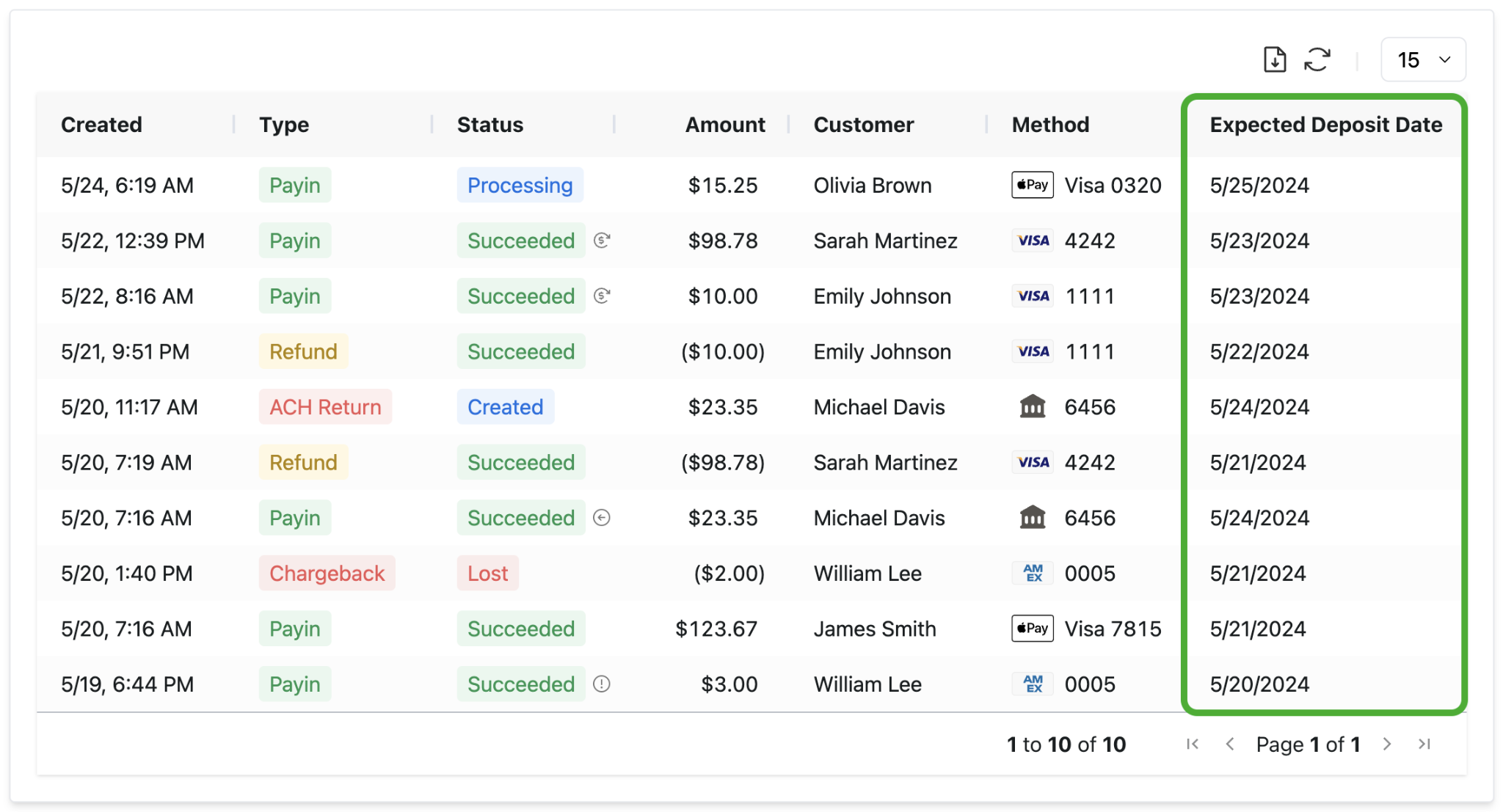
Rainforest provides an Expected Deposit Date for each payment, which represents an estimate on when the payment will be included in the merchant's deposit.
Deposit timing is dependent on the type of payment and the payment method used for processing, which can make it hard to keep track of when a payment is expected to be included in a deposit.
The Expected Deposit Date is visible for an individual payment in the payment details component and as a column in the payment report component.
Learn more about payment expected deposit date
Summary and next steps
Rainforest was built for the exact use cases vertical SaaS platforms encounter and the controls you need to deliver a winning payments experience:
- Customizable merchant billing profiles with dynamic overrides
- Configurable deposit frequency and timing
- Full visibility into deposit timing and merchant fees
Want more control over merchant billing and deposit timing? Contact Rainforest to request a payments strategy review
Share this article
Subscribe to our blog
Be the first to hear about new content

Related articles
View all articles


.png)
Get started today.
Boost revenue with Rainforest
Get Started

Legal

© 2026 Rainforest Pay, Inc
