

Multi-merchant splits: one payin, multiple recipients, full reversal control

.png)
A general contractor finishes a kitchen remodel and invoices the homeowner for $12,000. Simple enough on the surface. But the general contractor isn’t keeping all that money. The electrician gets their cut. So does the plumber, the cabinet installer, and the tile guy. The platform keeps their fee and the GC keeps what’s left.
One payment comes in. Five parties need to get paid. Historically, this has been a slow and manual process. The GC gets paid. They wait for the payment to settle, then send out a separate payment to each subcontractor.
And every one of those payments is something your platform has to manage, ledger, and reconcile.
Rainforest’s multi-merchant splits allow you to distribute one payment to multiple merchants
Rainforest now supports splitting a single payin across multiple merchants, in one API call, at the moment of acceptance!
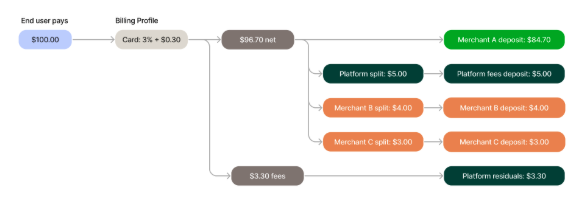
Amount splits could already support a single, dynamically defined platform fee on each payment. Now each payment can also be split between multiple merchants on your platform.
The split payment instructions are attached right to the payment config. There’s no separate API call, no separate transfer step, and no second system to reconcile.
Revising that kitchen remodel. The homeowner pays the GC. In that same API call, Rainforest deducts the platform’s fee, routes payments to the electrician, plumber, cabinet installer, and tile sub, and deposits the rest in the GC’s bank account. Each recipient’s allocation shows up on their own deposit report, on their standard deposit schedule. No manual routing, no spreadsheet, no drama.
You control refund and reversal handling
Payment acceptance is the easy half. The real test is when a payment gets reversed.
Picture that remodel again. There was an issue with the work and the GC issues a partial refund. But where does the money come from? Does it get pulled from the GC? One subcontractor? Everyone?
You decide. Every time you create an amount split, you can also specify how you want a refund to be handled. You configure, per recipient, whether their allocation is recovered on a full refund or ACH return, or whether they keep it and the originating merchant absorbs the difference. You also decide if billing fees get refunded back to the merchant(s) or stay with the platform.
And if the situation changes after the payin was created, you can override these settings on the refund request.
Traditional payment technology only supports one recipient per payout
Most payment providers weren’t built for vertical SaaS platforms, so they didn’t necessarily plan for one-to-many payment scenarios. When your payments technology only understands one recipient per payment, everything after the initial payment becomes your problem to solve.
You end up building a whole separate distribution system on top of your core payment acceptance product because you need to route each payment, track what’s paid, and untangle it all if there’s a refund or ACH return.
To split that one remodel payment on a typical processor, you’d charge the homeowner. Then you’d issue a separate transfer to each sub. Each transfer is an API call or manual action. And every transfer is money in flight, that you need to manage, track, and reconcile across sub-accounts.
Then the refund hits and there’s no built-in way to pull those transfers back. More calculations. More API calls. More ledgering. None of that is your core business.
Rainforest makes split payments easy
Rainforest does the whole thing inside the original payin config API call. Including reversal rules. One instruction, everyone paid, every allocation reconciled, and every merchant sees their piece on their regular deposit report.
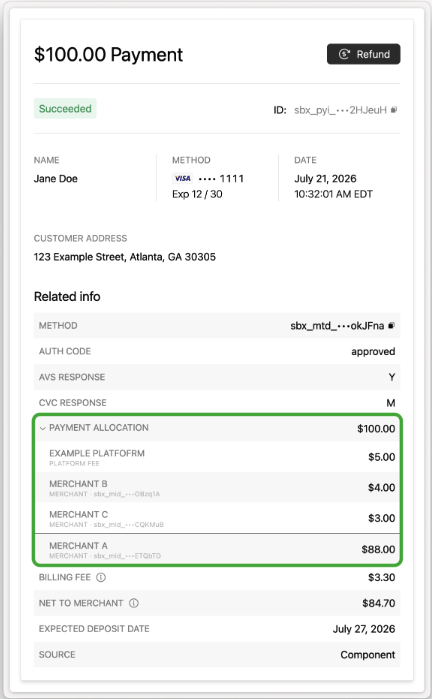
That’s the difference between a payment product you drive and one you clean up after.
Fewer support tickets about funds that haven’t been deposited, no messy reconciliation across multiple sub-accounts, and no merchant on the phone saying a refund was debited from the wrong place.
Multi-merchant splits works for platforms that distribute one payment to multiple merchants
Multi-merchant splits are for any platform that needs to distribute one payment to multiple merchants. Here are some examples:
- Association and membership dues: one dues payment split across national, state, and local chapters, plus the platform fee.
- Childcare and camps: tuition split between the center and independent enrichment vendors (music, sports, language instructors).
- Events and ticketing: ticket revenue split across the venue, promoter, and platform.
- Field services: split job payments between general and sub-contractors.
- Fitness: a class or membership payment split between the studio, the independent trainer, and even a franchisor royalty.
- Healthcare and dental: distribute membership or treatment payments across multiple billing entities.
- Home care: a client payment split between the agency, the caregiver or worker, and the platform.
- Nonprofit & donation platforms: a donor's gift split across multiple beneficiary organizations, plus the platform fee.
- Salons: a client's service payment split between the salon (booth rent/product) and the independent stylist
- Veterinary groups: split payments across a practice entity, a shared specialty/emergency group, and the platform.
If your merchants pay each other, this was built for you.
Enable multi-merchant splits with just a few lines of code
Multi-merchant splits are built right into Rainforest’s core capability, so there’s no new integration to use them. You define the splits and reversal rules on the payin config. Configure the deposit report to show splits. Then the distribution, reversal handling, and reporting follow from there.
Subscribe to our blog
Be the first to hear about new content

Related articles




Get started today.
Boost revenue with Rainforest


